Showing posts with label Spring. Show all posts

Sunday, 8 April 2018

Microservices with Spring Cloud - Learn by plain-vanilla code snippet

Are you looking for plain-vanilla code with lucid README instructions to learn Spring Cloud technology stack?

Well, I had explored, experimented and experienced building microservices using Spring Cloud almost a year ago. I may upgrade my Spring Cloud learning code to match latest version and include more features of it in this year.

Meanwhile if anyone is interested in below learning goals, the code is available @ https://github.com/tirthalpatel/Learning-Spring/tree/master/gs-spring-cloud/gs-microservices


Saturday, 8 July 2017

Spring Boot - Learning made easy by simple application

I hope, below mentioned plain-vanilla application would help you to quickly get started with Spring Boot and few supporting technologies/tools. Additionally, you may experiment Docker, Docker Compose and Pivotal Cloud Foundry, if not yet!
I am not writing step by step instructions again here, because README talks a lot @ https://github.com/tirthalpatel/Learning-Spring/tree/master/gs-spring-boot/gs-spring-boot-app

Learning Objectives

Try following with Spring Boot & run app by deploying on local machine / using docker compose / using docker / to pivotal cloud foundry.
  • Spring Boot + Spring Web (MVC and REST) + Thymeleaf (Template engine)
  • Spring Boot + Swagger UI (easily visualize and interact with the API’s resources)
  • Spring Boot + Properties customization
  • Spring Boot + Spring Data JPA + H2 Database + FlywayDB (deal with RDBMS)
  • Spring Boot + Spring Data REST + HAL browser (easy to build hypermedia-driven REST web services)
  • Spring Boot + Spring Data Redis (publish and subscribe to messages sent via Redis)
  • Spring Boot + Production-ready features of Spring Boot Actuator
  • Spring Boot + Hawtio (a lightweight web console to monitor and manage application)
  • Spring Boot + Developer Tools (for automatic restart, livereload support..)
  • Spring Boot + Lombok (a java annotation library to reduce boilerplate code)
  • Spring Boot + Testing (JUnit, Hemcrest, AssertJ, Mockito, Spring Test)

How to run the application?

Refer README for instructions to build, deploy and run application using below options. You must need Redis server for option 1, 2 and 3. For option 4, you don't need to set up Redis explicitly, as you can leverage Redis service from Pivotal CF marketplace.
  1. Using maven on local machine
  2. Using Docker Compose
  3. Using Docker
  4. Deploying to Pivotal Cloud Foundry (Cloud PaaS)

Saturday, 25 June 2016

Getting Started with Apache Camel using Spring Boot

Well, I am not going to write post to introduce Apache Camel and EIP concepts. Rather I'll just provide quick highlights of the Spring Boot based project skeleton, which I implemented to integrate hawtio and try it with Apache Camel @ https://github.com/tirthalpatel/Learning-Camel/tree/master/gs-camel-spring-boot-helloworld. For promptly getting started with it, you should obviously know Maven, Java and Spring (not necessarily Spring Boot).

First Things First - Understanding Fundamentals


  • Apache Camel is an open-source, lightweight, integration library that allows your applications to accomplish intelligent routing, message transformation, and protocol mediation using the established Enterprise Integration Patterns and out-of-the-box components with a highly expressive Domain Specific Language (Java, XML, or Scala). With Camel you can implement integration solutions as part of an overarching ESB solution, or as individual routes deployed to any container such as Apache Tomcat, Apache ServiceMix, JBoss AS, or even a stand-alone java process. Read more @ DZone Refcard - Essential Camel Components.
  • Enterprise Integration Patterns (EIP): Integration is a hard problem. To help deal with the complexity of integration problems the Enterprise Integration Patterns (EIP) have become the standard way to describe, document and implement complex integration problems. Apache Camel is an open source project for implementing the EIP easily in a few lines of Java code or Spring XML configuration. Read more @ DZone Refcard - The Top Twelve Integration Patterns for Apache Camel.
  • Integration Framework vs. ESB vs. Integration Suite: See remarkable presentation by Kai Wähner @ Spoilt for Choice: How to Choose the Right Enterprise Service Bus (ESB)?

Get Started with Apache Camel Practically

If you don't  know, what is Spring Boot, then immediately read about it. Believe me, it has already become super popular in Java world. Spring Boot nicely gels with Apache Camel too. Anyway you may get started with Apache Camel by following below steps, even if you don't know Spring Boot.

  1. Download or Clone "gs-camel-spring-boot-helloworld" project from Github.
  2. Prerequisites:
    • Java 1.8+
    • Maven (If maven is not installed on your machine, then just use maven wrapper "mvnw", which is already in project. Be aware that you may need to configure proxy settings, if you are in restricted corporate network.)
    • Spring STS or alternate IDE (Optional, but recommended)
  3. Run maven command at project's root to run project: gs-camel-spring-boot-helloworld > mvn spring-boot:run
  4. This would start Spring Boot's embedded server on default 8080 port. In case you need to change it to different port, then you can configure in "application.properties" file at "gs-camel-spring-boot-helloworld\src\main\resources".
  5. Refer README file to import project in IDE or maven's alternative option to run it.
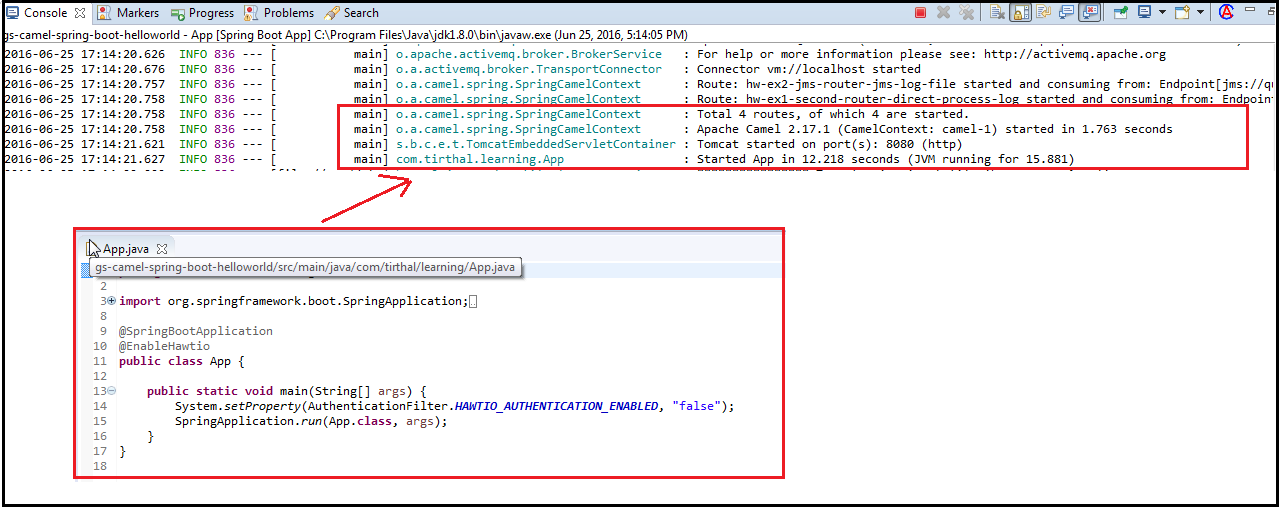
  6. Once you successfully run it, you should see following logs without errors. Well, App.java does all magic to provide Camel Context with help of Spring Boot. (Alternatively, we may write code for creating Camel Context without using Spring.)
  1. Next, you can see logs for executed example code of router configurations, which is using Camel Java DSL.
  1. Then, open hawtio web console in browser @ http://localhost:8080/hawtio/index.html, which I have already integrated in the project. You can see "HelloWorldRouterFirst.java" has timer component, which triggers events and sends to "direct:helloWorldChannel" end-point. In "HelloWorldRouterSecond.java", it route message from "direct:helloWorldChannel" end-point to further. You can see, "HelloWorldRouterFirst.java" has implemented "Deal Letter Channel EIP". To try it practically, just pause or stop "hw-ex1-second-router-direct-process-log" route and see how it reacts. When "hw-ex1-second-router-direct-process-log" is running, it does its job as per configuration in "HelloWorldRouterSecond.java". When "hw-ex1-second-router-direct-process-log" is unavailable (paused or stopped), all events triggered by "hw-ex1-first-router-timer-bean-direct" route would go to "DeadHelloWorldQueue" queue automatically as per configured Camel provided "Deal Letter Channel EIP".
  1. Likewise, following snapshot speaks about another "HelloWorldJmsRouter.java" example router.
  1. Finally, you can implement few examples in similar way using any Camel supported DSL and Components as per your interest. Just ensure to annotate router component with @Component annotation, implement camel's RouteBuilder and add necessary dependencies in Maven's pom.xml. (Read Apache Camel with Spring Boot post to understand how we get Camel context magically.)

Also Refer

Sunday, 16 November 2014

Core Spring - Learning made easy by sample code snippet

Spring already provides many getting started guides.  Also you would find unlimited blogs, tutorials and ebooks related to Spring framework and projects on internet. Yet I thought to add one more post on Core Spring to the list... :-)

Anyway, to cut a long story short, this is just to let people know that I had made my learning code snippets (along with some notes) of Core Spring on GitHub publically available. It can be useful to you, if you wish to learn key concepts of Core Spring quickly by referring to readily available code snippets, get your hands dirty by altering the code snippet to explore further, refresh it for interview purpose, etc.

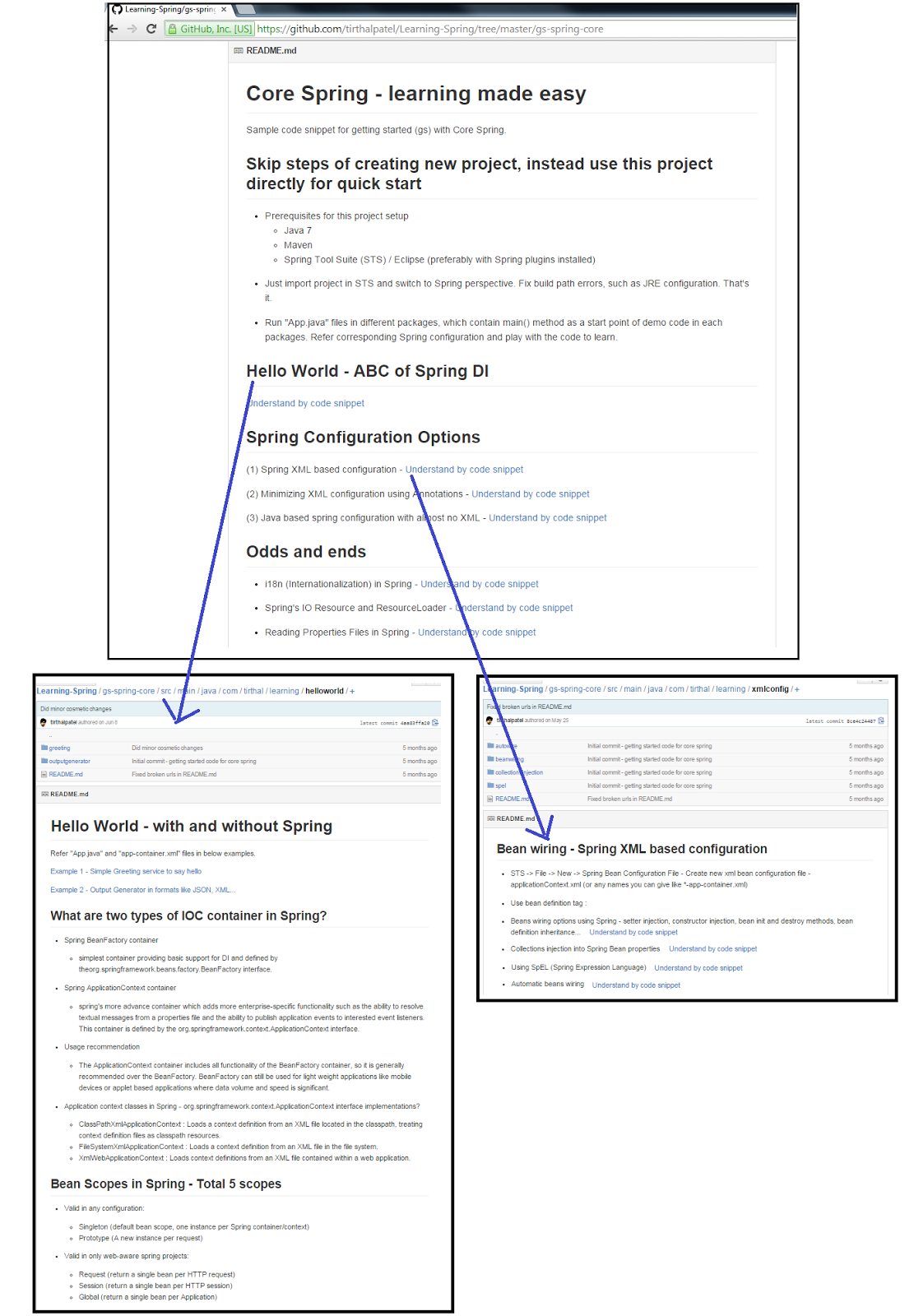
Learning-Spring Repository URL@ https://github.com/tirthalpatel/Learning-Spring. Clone or download it to your local machine from the Github and refer README of gs-spring-core for project setup. Below screenshot highlights what you would get in this project.


When I say "Spring Core", it refers to the foundation of Spring Framework as highlighted with red color boundary in below diagram.


Also you can refer my another post on "Executive Overview of Spring IO" to get a bird's-eye view of Spring IO platform and projects.

Also Refer

Saturday, 16 August 2014

Executive View of Spring IO

Pivotal released the first version of their new Spring IO Platform 1.0 in June 2014, which is indeed in line with original Spring's aim: bring simplicity to Java development.

Before moving to executive highlights of Spring IO platform, one should know some formerly vs. current key points about Spring.
Formerly
Now
Referred as "Spring Framework and related project"
Highlighted as "Spring IO Platform = Spring IO Foundation + Spring Execution"
Spring framework founders -> Created SpringSource -> Purchased by VMWare -> In April 2013 VMware, and its parent company EMC Corporation created a joint venture called Pivotal
Sponsored and led by Pivotal

A bird's-eye view of Spring IO Platform and Projects

Following mind mapping diagram represents high level view of Spring IO, which brings together the Spring family of projects into a cohesive and versioned foundational platform for modern applications. On top of this foundation it also provides domain-specific execution environments for a variety of enterprise workloads.

(Right click the image - Open in New Window - Zoom it)


References